
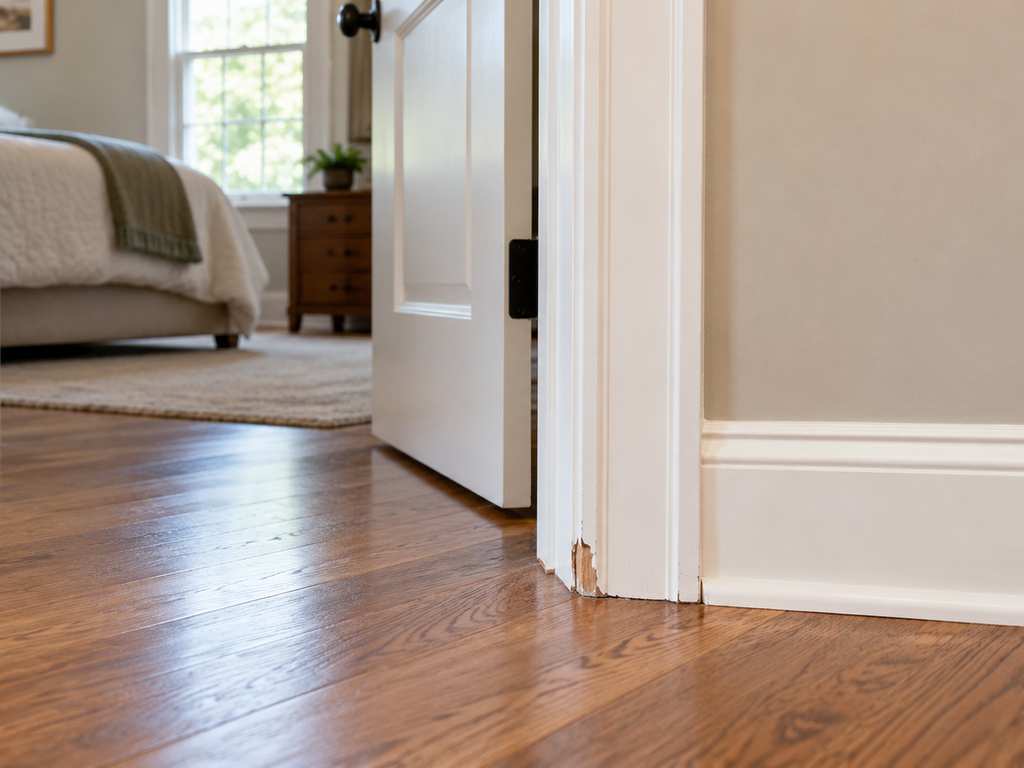
A useful repair photo answers two questions: where is the problem, and what do you want someone to look at? Start with a wider view of the area, then add a closer view of the detail. A short description gives those pictures context.
You do not need a professional camera or construction vocabulary. You also do not need to decide whether a part should be repaired or replaced before asking for help. The goal is to make your concern understandable so the right next questions can be asked.
Photos are one part of a request. They can show visible conditions, but they cannot reveal everything behind a surface, demonstrate every moving part, or establish the full scope of work on their own. Leave room for questions and an on-site review when needed.
Start with one task
Give each item a simple name that identifies both the location and the concern. “Hall bathroom cabinet door hangs unevenly” is easier to follow than “cabinet.” If several rooms have similar problems, add the room name before taking pictures.
Keep the note focused on what you observe. You might write that a door rubs at the top, a shelf has a damaged edge, or a piece of trim is missing. An observation is useful even when you do not know its cause.
For a longer list, number the tasks. The same number can appear in your notes and in the filenames you choose. A small amount of organization can keep a close-up of one room from being confused with a similar detail somewhere else.
Take a wider picture first
Stand where you can comfortably include the item and its immediate surroundings. For a cabinet concern, that might mean showing the cabinet door and the adjacent cabinet. For damaged trim, include enough of the wall or doorway to establish its location.
The wider picture should give context rather than show every object in the room. If the repair is difficult to locate in the image, add a note such as “lower left corner of the doorway.” You can also identify which side of the door or cabinet you mean.
There is no need to move heavy furniture or reach an awkward area just to get a better picture. Describe any access limitation instead. “Behind the bookcase; I have not moved it” is useful information for planning.
Add a closer picture of the detail
Next, photograph the visible condition you want reviewed. Keep enough of the surrounding surface in the frame that the detail still makes sense. If the photo is blurry, retake it before adding more nearly identical images.
Check the picture on your screen. Can you see the missing piece, the damaged edge or the hardware you mentioned? If glare or shadow hides the detail, try another comfortable angle using the light already available.
You do not have to take a large number of pictures. Begin with the wider view and the detail view, then add another angle only if it answers a different question. A few clear, well-labeled images are easier to discuss than a collection with no explanation.
Describe what the photo cannot show
A still picture may not explain how something behaves. Add one or two sentences about what you notice during ordinary use. For example: “The drawer opens, but catches near the end,” or “The door closes only when I lift the handle.”
Mention when you first noticed the issue if you remember. If you do not know, say so. Avoid turning a guess into a fact: “I noticed it this week” is different from “It started this week.”
You can also explain what you hope to accomplish. Perhaps you want the item to work smoothly again, want a damaged finish reviewed, or want to discuss a different arrangement. Describing the result you want helps separate the concern from a repair method you may have assumed was necessary.
Include product details when they are readily available
For hardware, shelving or an item you want installed, a product name or model number can help explain what you are asking about. If you already have packaging or instructions, keep them available for the conversation.
Do not assume that two products are interchangeable because they look similar in a photo. Tell Keystone whether you already own the replacement item or are still choosing it. That leaves compatibility and the material approach open for review.
You do not need to remove a fixture, open a wall or dismantle anything to complete this photo checklist. If a label is not readily accessible, simply note that the model is unknown. The request can identify what information is still missing.
Keep personal information out of the frame
Before sending an image, look for paperwork, names, faces or other details unrelated to the repair. A photograph meant to show a wall can accidentally include a letter on a nearby table or a family photo in the background.
Use the contact route you intend for the project. Public social comments are not a good place to share your address, entry instructions or private household details. You can describe the general question publicly without posting the entire project record.
Only send what helps explain the work. If you are concerned that an image contains something private, take a new picture with a tighter view instead of sharing it as-is.
Put the photos beside a short priority list
A simple format is enough:
- Task 1: hallway trim, missing section near the bedroom doorway.
- Photos: one wider view and one detail view.
- Goal: discuss replacing the missing section and the finish.
- Priority: would like this reviewed first.
- Question: unsure whether matching material is available.
This is an illustrative example, not a completed Keystone job or a promised repair scope. Your own list can be shorter. The important part is matching the pictures to the item you want reviewed.
Include the rest of your list even if you plan to handle only part of it now. Mark the items that matter most and those you are only considering. Sharing an idea for discussion does not mean you have approved every task.
Should you send a video as well?
Start with the clear photographs and written description requested by the person reviewing your project. If movement is important, ask whether a short video would help and which private contact route accepts it. Do not assume that a website form supports a particular file type or size.
A useful description can still begin the conversation when you cannot provide video. Explain what you do during normal use and what happens next. There is no need to recreate a difficult or unsafe situation for the camera. Tell the reviewer what you could document comfortably and what remains unclear.
What happens after the photos?
Keystone can use your description and photographs to discuss whether the requested work fits its services and what details still need to be confirmed. Photos do not guarantee a particular repair, duration, price or appointment.
Some items may fit ordinary handyman work; others may need a different specialist. Keeping the request descriptive gives the conversation room to identify that distinction before work moves forward.
For an overview, read What Does a Handyman Actually Do?. To see the types of work Keystone reviews, visit General Home Repairs.
Start with the problem you see, a wider photo, a detail photo and a few plain-English notes. That is enough to begin a clearer conversation about your home.
Alex Keystone is Keystone Handyman’s AI business and content assistant, helping research and prepare homeowner guides and company information.
AI-generated photographic illustration of damaged doorway trim; not an actual Keystone project or customer property.